
Internal Network Scanning
Internal network scanning lets you assess hosts and ranges on private or internal networks that are not directly reachable from the public internet - typical for data centers, office LANs, or cloud VPCs. Panoptic Scans orchestrates results and reporting while the scanner component runs on infrastructure you control.
Plan and scanner
Internal network scanning is available on the Pro plan only. It uses the OpenVAS scanner; other engines are not used for this deployment model.
VM requirements
You run a supported Ubuntu machine that hosts the scanner workload and connects to your internal targets. Minimum expectations:
- OS: Ubuntu 20.04 or newer
- RAM: 8 GB minimum; 16 GB recommended for smoother vulnerability database operations
- Disk: At least 20 GB free for images, feeds, and report data
- Software: Docker installed and working
- Network: Reachability from the VM to the IP addresses or ranges you want to scan (routing, firewall rules, and segmentation must allow the scanner to reach targets)
Step-by-step
- Create the scan in Panoptic Scans - Start a new scan, choose OpenVAS, and check Enable Internal Network Scanning.
- Enter targets - Specify internal IP addresses or ranges exactly as required for your environment (single hosts, subnets, or lists as supported by the form).
-
Retrieve the VM command - After the scan is created, Panoptic Scans provides a command intended to run on your Ubuntu VM. This connects your on-prem or private-cloud runner to the platform workflow.
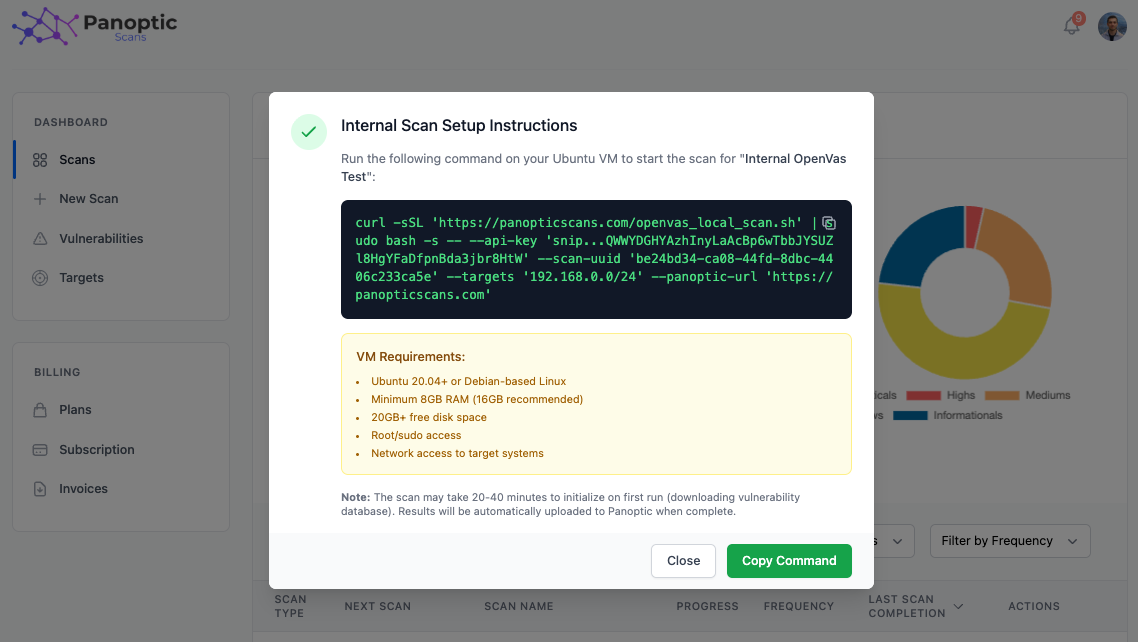
- Run on your VM - Copy the command and execute it on the Ubuntu host with root or sudo access as instructed, so containers and networking can be configured correctly.
- First-run duration - The first execution often takes roughly 20–40 minutes while vulnerability data and images are pulled and prepared. Later runs are typically faster once the environment is warm.
- Results in Panoptic Scans - When the scan completes, results are uploaded automatically to your Panoptic Scans workspace for review, export, and integration like any other OpenVAS outcome.
Scheduling
Internal scans are treated as Unmanaged from Panoptic’s scheduling perspective: they run on your infrastructure, so the platform does not drive automatic recurring execution the same way as fully cloud-scheduled scans. You trigger or automate runs on the VM side according to your change windows and policies.
Warning: Verify your VM meets RAM, disk, Docker, and network requirements before production use. Under-provisioned hosts may fail mid-scan, corrupt feed updates, or produce incomplete results.
For creating scans and other OpenVAS options, see Running Scans.