
Webhooks
Navigate to Webhooks
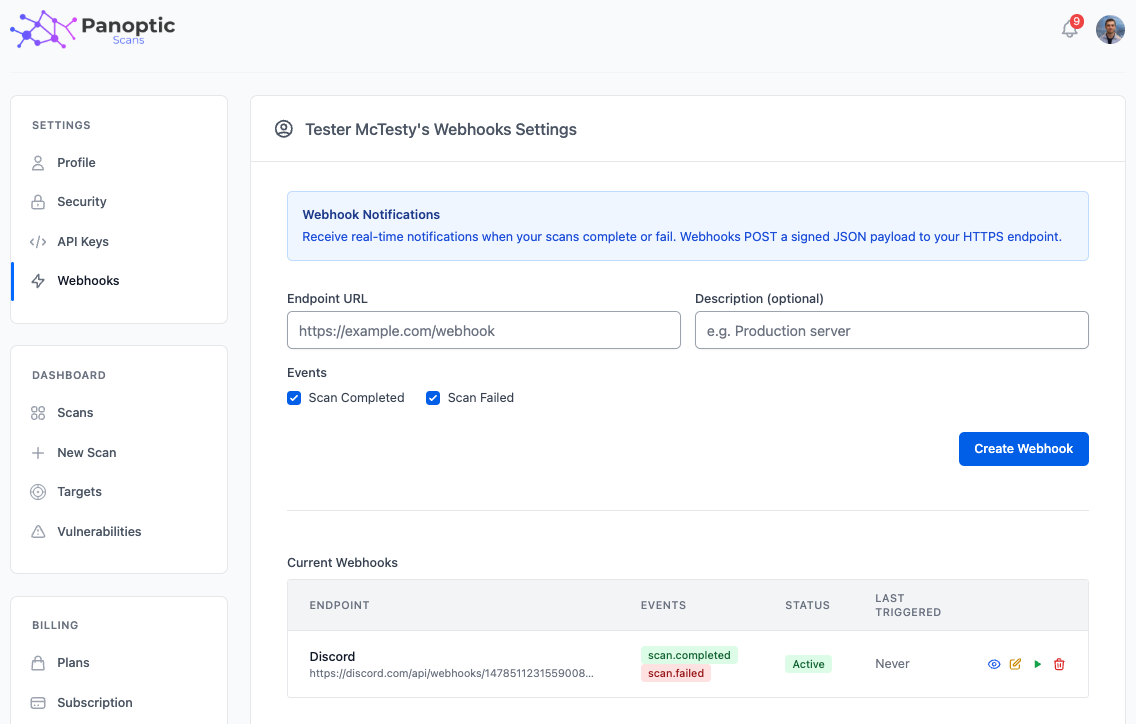
In the app, go to Settings → Webhooks.
What webhooks do
Webhooks send real-time HTTPS POST notifications to your endpoint when scans complete or fail, so your systems can react without polling the API.
Creating webhooks
Configure an endpoint URL (must use HTTPS), an optional description, and select which events to receive, such as scan.completed and scan.failed.
You can register up to 10 webhooks per account.
Managing webhooks
For each webhook you can view details, edit settings (URL, description, events, active/inactive state, and rotate signing secret), test the endpoint (sends a ping event), or delete the webhook.
Signing secret
Each webhook receives a unique HMAC-SHA256 signing secret. Use it to verify that payloads genuinely come from Panoptic Scans and have not been tampered with in transit.
You can rotate the signing secret from the edit flow when you need to invalidate an old secret (for example, after a leak or team change).
Payload format
Deliveries are JSON POST bodies that include scan-related details your integration can parse and act on.
Tip: Use the Test button to confirm your endpoint receives webhooks correctly before you rely on them in production workflows.