
API Keys
Navigate to API Keys
In the app, go to Settings → API Keys.
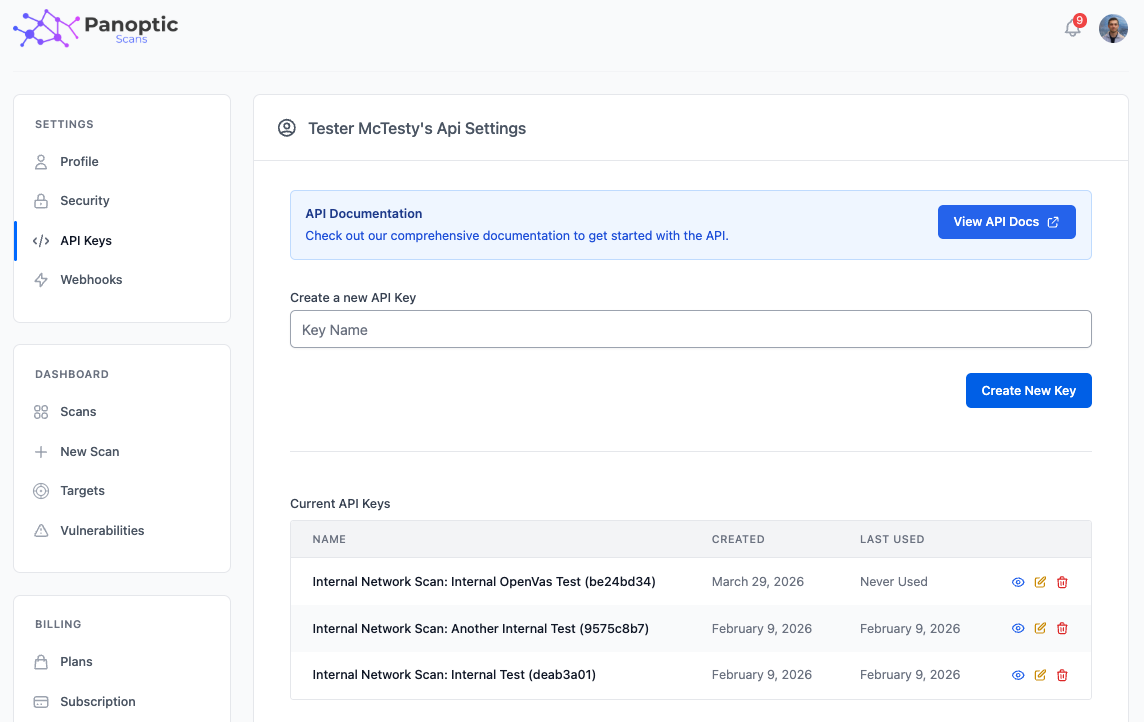
Creating API keys
Enter a descriptive key name, then click Create New Key. Store the secret securely when it is shown; it may not be displayed again in full depending on your workflow.
Viewing and managing keys
For each key you can see its name, creation date, and last used date. Each key supports:
- View — Shows the full key value when you need to copy it into a client or script.
- Edit — Rename the key.
- Delete — Revoke the key permanently.
Authentication
Keys are used to authenticate against the REST API: you exchange an API key for a JWT access_token and use that token for subsequent requests. See the full reference in the API documentation at /api.
Info: The interactive API reference lists every endpoint, parameters, and response shapes.
View API DocsHow should I store API keys?
Treat API keys as secrets. Store them in a password manager or CI secret store, rotate them if they leak, and give each integration its own named key so you can revoke one client without breaking others. Keys are exchanged for a JWT access token; do not embed the long-lived key in a public frontend. See the REST API guide for authentication headers and rate limits.